
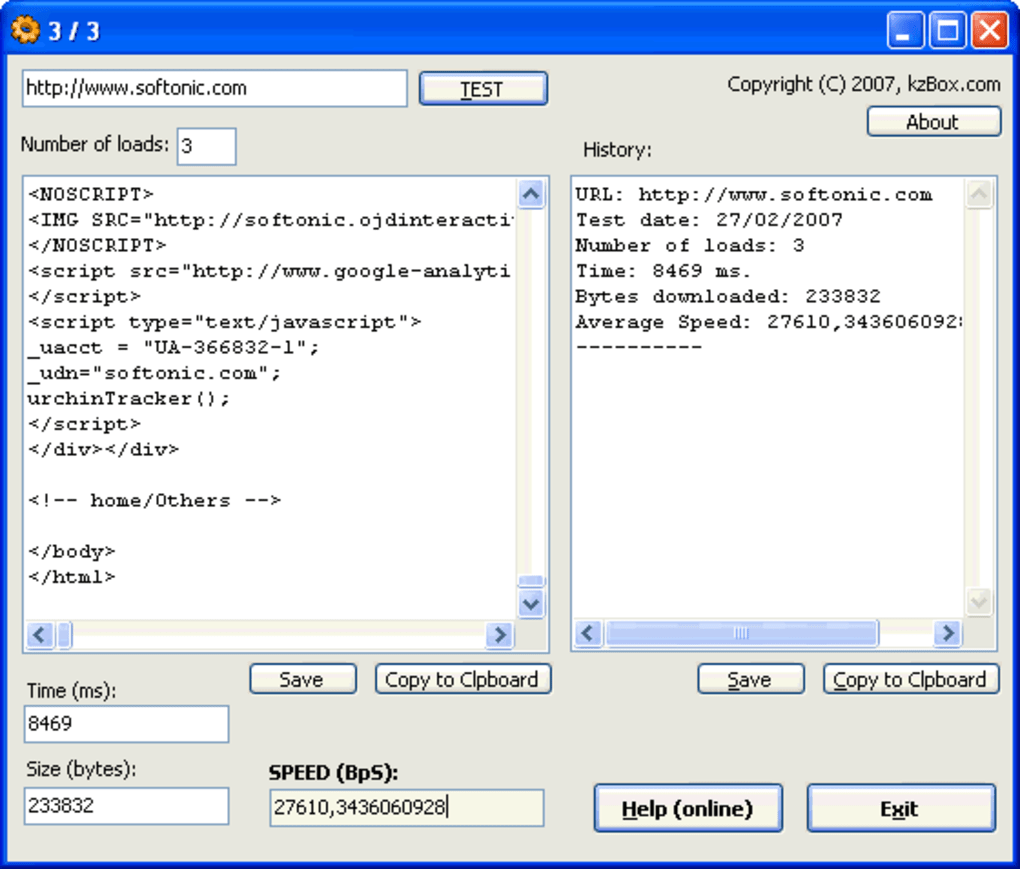

Site Speed Tester herunterladen – Kostenloses Windows-Tool zur Messung der Website-Download-Geschwindigkeit
Übersicht
Site Speed Tester ist ein leichtgewichtiges, kostenloses Windows‑Dienstprogramm, das speziell für die Messung der durchschnittlichen Download‑Geschwindigkeit jeder Website entwickelt wurde. Es gehört zur Kategorie „Browsers“ mit der Unterkategorie „Browser tools“ und bietet eine unkomplizierte Oberfläche, mit der Benutzer schnell beurteilen können, wie schnell eine Seite vom Server zum Client geladen wird. Seit seiner Einführung im Jahr 2007 hat Site Speed Tester weltweit mehr als 2.200 Downloads erzielt, mit einer starken Nutzerbasis in den USA, Deutschland und mehreren anderen Ländern.
Die Software läuft auf Windows 2000 und früheren Versionen und ist damit eine ideale Wahl für Altsysteme, die weiterhin Leistungsüberwachung benötigen. Ihr geringer Speicherbedarf sorgt dafür, dass sie keinen Festplattenspeicher belegt, und die rein englische Benutzeroberfläche hält die Lernkurve flach. Zuletzt aktualisiert am 27.
Februar 2007, bleibt Version 1.0 stabil, sicher und sofort einsatzbereit. Ob Sie ein Web‑Entwickler sind, der Seiten‑Assets feinabstimmt, ein Netzwerk‑Administrator, der Latenzprobleme behebt, oder ein SEO‑Spezialist, der datenbasierte Einblicke sucht – Site Speed Tester bietet eine zuverlässige, kostenlose Lösung, die sich nahtlos in Ihren Arbeitsablauf integriert.
Hauptfunktionen
- Instant Speed Measurement: Retrieve average download speeds for any URL with a single click.
- Lightweight Architecture: Requires minimal storage and memory, perfect for older Windows machines.
- Simple User Interface: Clean, English‑only layout that eliminates confusion for non‑technical users.
- Multiple Test Runs: Conduct sequential tests to average out fluctuations caused by network jitter.
- Exportable Results: Save speed data to plain text or CSV for further analysis or reporting.
- Compatibility Mode: Works on Windows 2000 and earlier, ensuring legacy support.
- Free & Secure: No hidden fees, adware, or telemetry—just pure performance data.
Installations‑ und Nutzungsanleitung
Site Speed Tester zu installieren und zu starten ist ein Kinderspiel, selbst für Nutzer, die nicht mit Softwareinstallationen vertraut sind. Befolgen Sie diese Schritte für ein reibungsloses Erlebnis:
- Download the Installer: Click the “Download” button on the official page. The file is a compact .exe that typically weighs less than 5 MB.
- Run the Installer: Double‑click the downloaded file. Because the program targets older Windows versions, you may see a Windows 2000 compatibility prompt—simply confirm to proceed.
- Accept the License: The installer presents a brief EULA. Read it, check the “I accept” box, and click “Next.”
- Choose Installation Folder: The default location (C:\Program Files\SiteSpeedTester) works for most users. Adjust if you have a custom drive layout, then click “Install.”
- Complete Installation: Once the progress bar finishes, click “Finish.” You may be asked whether to launch the application immediately—select “Yes.”
- Run a Test: In the main window, paste the full URL of the website you wish to evaluate (e.g., https://www.example.com). Click the “Start Test” button.
- Interpret Results: After a few seconds, the program displays the average download speed in kilobits per second (kbps) and megabits per second (Mbps). For deeper analysis, click “Export” to save the data.
- Repeat as Needed: For more accurate insights, run the test at different times of day or from different network connections.
Because the software does not require administrative privileges on most systems, you can install it on shared workstations without impacting other users. Regular updates are not mandatory—version 1.0 has proven stable for over a decade, but you can always check the developer’s site for patches or enhancements.
Kompatibilität, Vor‑ und Nachteile
Site Speed Tester ist für Windows 2000 und frühere Betriebssysteme gebaut, was es zu einem der wenigen modernen Werkzeuge macht, das noch Legacy‑Umgebungen unterstützt. Es läuft reibungslos auf 32‑Bit‑Architekturen und benötigt weder .NET Framework noch andere schwere Laufzeitumgebungen, was die Kompatibilitätsbedenken weiter reduziert.
Vorteile
- Free to download and use with no hidden charges.
- Extremely low system requirements—ideal for older PCs.
- Fast, one‑click testing process.
- No ads, telemetry, or bundled software.
- Exportable results for documentation or reporting.
Nachteile
- Interface looks dated compared to modern tools.
- Lacks advanced analytics (e.g., waterfall charts).
- No native support for macOS, Linux, Android, or iOS.
- Last official update was in 2007; community support is limited.
- Only measures download speed; does not assess latency or DNS lookup time.
Häufig gestellte Fragen
Is Site Speed Tester safe to install on my computer?
Yes. The program is freeware with no bundled adware or spyware. It has been distributed through reputable download portals for over a decade, and the installer is digitally signed for Windows 2000 compatibility.
Can I test HTTPS sites with Site Speed Tester?
Absolutely. The tool supports both HTTP and HTTPS URLs. Simply enter the full address, and the program will handle the secure connection automatically.
What does the “average download speed” actually measure?
It calculates the amount of data transferred from the web server to your computer over a short period, then divides that total by the elapsed time. The result is presented in kilobits per second (kbps) or megabits per second (Mbps), giving you a practical view of how quickly a page’s assets are delivered.
Do I need an internet connection to use Site Speed Tester?
Yes. The application works by contacting the target website, so an active internet connection is required for each test. However, the software itself does not need a persistent online license or activation.
Can I automate speed tests for multiple URLs?
The free version does not include batch processing, but you can script repetitive runs using Windows command‑line parameters or by creating a simple batch file that launches the executable with different URLs.
Fazit & Handlungsaufruf
Site Speed Tester bleibt eine solide Wahl für alle, die eine schnelle, unkomplizierte Methode zur Messung der Website‑Download‑Performance auf älteren Windows‑Maschinen benötigen. Sein kostenloser Preis, der winzige Speicherbedarf und die einfache Bedienung überwiegen das bescheidene Design und die begrenzte Analytik. Wenn Sie Legacy‑Systeme verwalten, ein portables Geschwindigkeit‑Tool benötigen oder einfach ein Werkzeug bevorzugen, das eine Sache außergewöhnlich gut erledigt, verdient diese Anwendung einen Platz in Ihrem Werkzeugkasten. Download Site Speed Tester now to start measuring page speeds instantly—no registration, no cost, just reliable data.
Pros: Free, lightweight, easy to use, exportable results.
Cons: Outdated UI, limited to Windows 2000, no advanced metrics.







